

Understand Audi suspension coding versus Virtual Link adjustment. Compare calibration, saved heights, compatibility checks and returning to baseline.
VCDS and OBDeleven can be useful ways to lower a compatible factory-air Audi, especially if you already own the tools and plan to leave the height alone after adjustment. Virtual Link is aimed at owners who want to keep changing and recalling their preferred stance conveniently. You do not have to choose one tool for every job. Diagnostic equipment remains useful for servicing the vehicle; an electronic ride-height controller provides a more accessible way to manage everyday settings.
What a calibration change actually does
Suspension calibration relates the sensor information to the vehicle's measured position. On supported systems, adaptations can change the baseline that the factory controller uses. That can alter stance, but the process must match the suspension controller and its requirements. Ross-Tech's UDS level-control instructions describe a specific calibration procedure, including prerequisites and measured corner heights. They also identify reset functions that should not be used as part of that procedure. A copied sequence from a different Audi is not a substitute for the correct instructions. Before changing anything, save accessible original values and record the wheel-center-to-fender measurements. Incorrect or incomplete calibration can leave faults that need professional attention. Keep the measurements and settings together so an installer can understand what changed if the setup needs attention later.
Check what your diagnostic tool supports
OBDeleven functions vary by vehicle and equipment. Its Showroom Mode listing is an example of a specific function whose applicability needs checking. A parked display function and an adaptation routine are different operations. Confirm what the proposed function changes, what equipment or paid access it needs and how to restore the previous setup. If a shop is performing the work, ask how a later height change will be handled. The convenience of that next adjustment can matter as much as the initial cost.
Saved profiles change the ownership experience
Virtual Link provides front and rear adjustment through a Wi-Fi web interface or Bluetooth mobile app. Save the positions you like and assign them to supported factory drive modes. Normal configured operation continues without the app open or the phone connected.
You can keep a familiar cruising height, a low parked profile and another position for a particular route or use. Recalling a profile does not require repeating a diagnostic calibration procedure. The Drive Select mapping guide explains how profile creation and mode assignment work together. Corner calibration establishes the reference for that setup. Front and rear presets then describe the positions you want to use. Keeping those tasks separate helps you understand what you are changing and return to a known setting when experimenting.
Baseline calibration and everyday adjustment
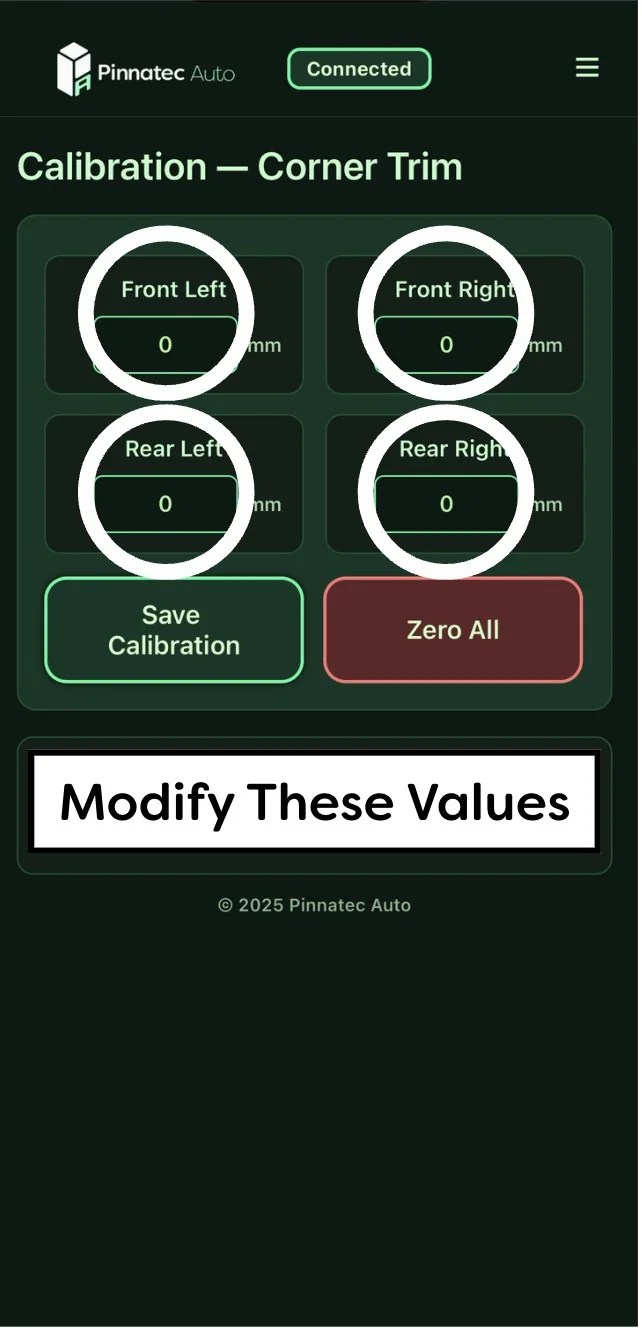
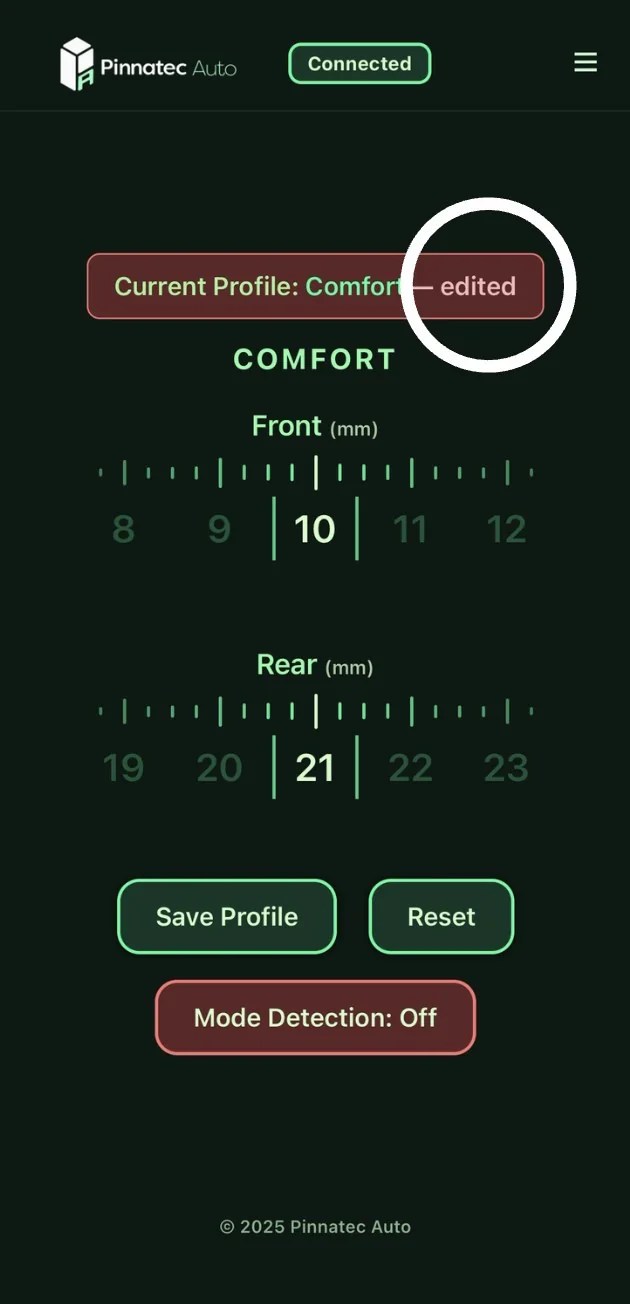
Web-interface examples from Pinnatec: corner calibration on the left, front/rear operating controls on the right. Displayed values are examples, not recommended settings.
The four corner values establish a reference. The front and rear sliders then adjust the operating profile relative to that reference.
Existing coding and lowering links can stay part of the conversation
If the vehicle is already lowered, tell the installer what has changed. A used car may have adaptation changes as well as aftermarket links, and their effects do not disappear when a new controller is connected. Virtual Link works with factory or aftermarket lowering links. It does not require a wholesale return to stock, but the starting point needs to be understood. A zero setting will not necessarily equal original factory height. See whether you need to remove lowering links for the setup considerations. Resolve existing suspension faults before building profiles. Virtual Link provides height control; it is not a repair for a leak, damaged sensor or incorrectly completed calibration.
Choose around how often you will adjust
An occasional, documented adaptation may be all some owners need. If you expect to fine-tune rake, try different heights or alternate between everyday and show settings, Virtual Link makes those changes easier to manage. For the wider buying decision, compare links, coding and controllers. If convenient adjustment is the priority, check which Virtual Link fits your Audi and use the matching installation guide.
Ready to choose your setup?
Buy now
