

Compare Audi air suspension controllers, lowering links and coding. Find the right approach for your stance, daily driving and saved ride heights.
Lowering links, suspension coding and electronic controllers can all change the stance of an Audi with compatible factory air suspension. The useful question is how much control you want after the first adjustment. Are you choosing one height and leaving it there, or do you want to change the setup as you use the car? Virtual Link is built for the second approach. It combines front and rear adjustment, saved presets and supported factory drive-mode mapping, so your preferred stance is easy to change and recall. Links and coding still have their place. Here's what each approach offers.
Lowering links: set the offset and leave it
Adjustable lowering links change the mechanical relationship between the suspension and its height sensors. That changes the reference the factory system uses to control the car's position. For someone who wants one consistent offset, links can be a simple, cost-effective choice. The trade-off appears when you want another adjustment. You need access to the hardware again, and the links themselves cannot store presets or provide on-the-fly electronic control. Factory modes may still change the vehicle's height, but the links do not let you assign a separate custom offset to each mode. Links also do not add a dedicated air-out command. Trying to achieve an aggressive drop through the sensor offset can run into the factory system's operating limits and produce errors, depending on the vehicle and adjustment. Follow the correct fitting procedure, including care around the sensor arms; TGK's lowering-link instructions provide one example.
Coding: useful for an occasional change
VCDS and OBDeleven can access supported suspension adaptations and calibration functions. If you already own a suitable tool and understand the procedure, coding may be an economical way to establish a different baseline. Changing that baseline again requires the appropriate equipment and procedure. This is less convenient than selecting a saved profile, especially if a workshop handles the adjustments. Incorrect or incomplete calibration can cause suspension faults and require professional recalibration. Record the original settings and follow instructions for the actual controller in your car. Our VCDS and OBDeleven comparison explains the difference between a calibration procedure and everyday height control. Diagnostic tools remain useful for maintenance even if you choose a separate controller for stance adjustment.
Virtual Link: choose the height when you need it
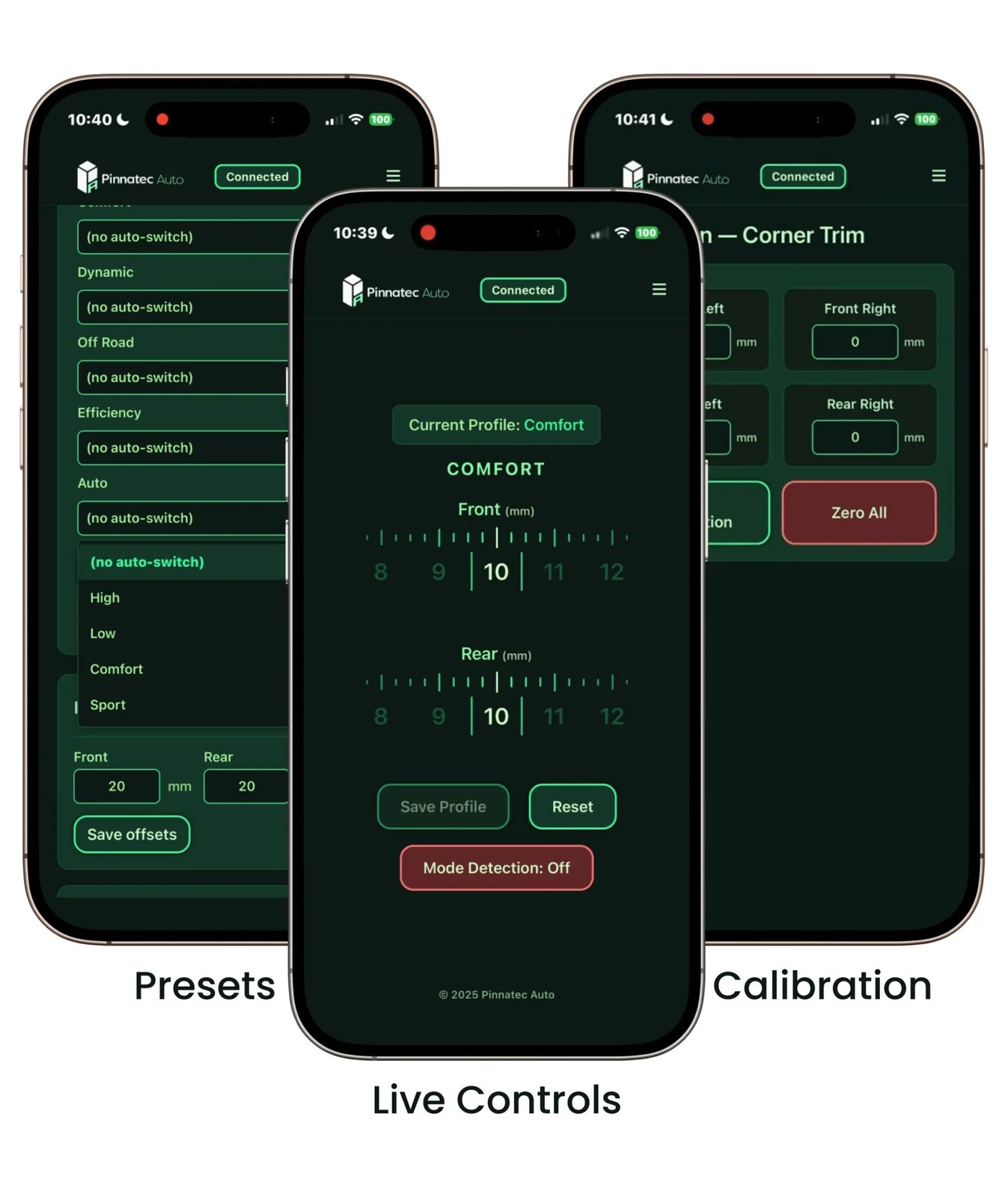
Virtual Link lets you adjust the front and rear through a Wi-Fi web interface or Bluetooth mobile app. Save the positions you like and assign them to supported factory drive modes. Your phone does not need to remain connected, and the app does not need to stay open for the configured setup to operate. You can change height on the fly within the available range of the suspension. Front-to-rear balance, often called rake, is adjustable, while corner-by-corner calibration establishes an accurate starting point. A low parked profile and a familiar everyday stance can both remain available without another mechanical adjustment. That flexibility also suits owners who want separate settings for cruising or a closed-course setup. Saving a height makes it repeatable; selecting a lower height alone does not establish a handling or launch-performance improvement. Choose operating positions around the actual travel and clearance of your build.
Use calibration to establish the baseline, then save the front/rear combinations you want to recall. These are separate parts of the setup.
You can keep the parts already on the car
Existing lowering links do not have to come off to install Virtual Link. It works with factory or aftermarket links and compatible aftermarket suspension components while the supported factory air-suspension control system remains in place. Account for earlier coding and mechanical offsets during setup. A zero controller setting does not automatically undo either. Our guide to keeping lowering links explains how to establish the baseline before saving new profiles.
Which approach fits your plans?
Links make sense for a single offset. Coding can suit an occasional, carefully documented adjustment. Virtual Link adds convenient control when you want to revisit the stance, save different heights and use the car's supported drive modes to select them. Confirm factory air suspension rather than DRC, then check Virtual Link fitment for your exact Audi. Installation differs between A1 and B1, so use the matching guide when planning the job.
Choose your adjustment method
| Links | One mechanical offset; later changes require hardware access. |
| Coding | A supported diagnostic procedure changes the baseline. |
| Virtual Link | Saved front/rear profiles and supported drive-mode mapping. |
Ready to choose your setup?
Buy now
