

Keep your lowering links when adding Virtual Link. Learn how existing offsets, aftermarket suspension parts and calibration affect the setup.
No. You do not need to remove your lowering links to install Virtual Link. The controller works with factory links and aftermarket lowering links, so you can add electronic height control to an existing lowered setup. You also do not need to return the rest of the suspension to stock. Compatible aftermarket wheels, control arms, valve blocks, valves, air lines, air tanks, air bags and dampers can remain installed, provided the vehicle retains the supported factory air-suspension control system.
Lowering links introduce a mechanical offset by changing the relationship between the suspension and its height sensors. That offset remains present when Virtual Link is installed. The controller's settings therefore need to be understood in the context of the hardware already on the vehicle. Selecting zero in Virtual Link does not necessarily put the car at its original factory height. It does not physically return an adjustable link to its factory dimensions, and it does not automatically reverse earlier coding changes. This is a setup consideration rather than a reason to remove working parts. Record the baseline and account for the offset before creating the profiles you intend to use.
The sensor link and the electronic connection
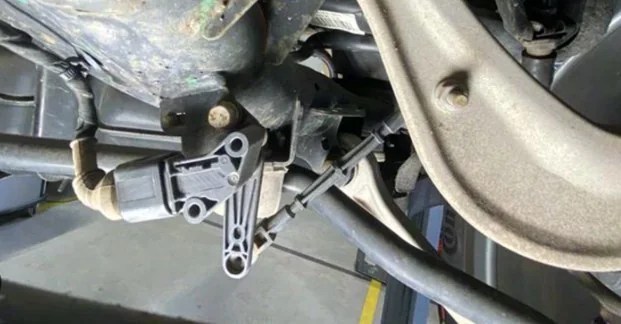
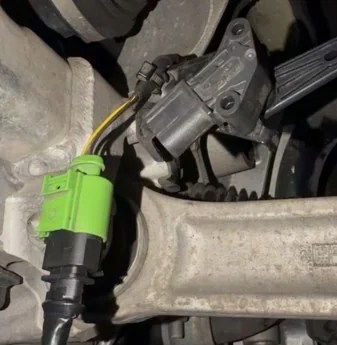
B1 guide photos: sensor/link area and inline harness connection. The pictured link is not identified as aftermarket.
The mechanical link remains part of the height reference. Account for its offset when establishing the controller baseline.
Keep compatible aftermarket components
A wheel change or a replacement control arm does not automatically prevent Virtual Link from operating. The same principle applies to compatible replacement air bags, dampers, air tanks, air lines, valves and valve blocks. The key condition is that the complete installation remains compatible with the factory air-suspension control system supported by Virtual Link. A conversion that replaces that management system is a different configuration and needs its own compatibility assessment. This does not mean every aftermarket component or combination is interchangeable. Each part still needs to suit the vehicle and the rest of the suspension. Tell the installer what is fitted so routing, calibration and the available range can be evaluated as a complete setup.
Establish a useful baseline
Begin with a normally functioning suspension. Record the wheel-center-to-fender measurement at each corner on level ground, the selected factory mode and the usual vehicle load. Note any known adaptation changes as well as the links and other replacement components. Follow the Pinnatec setup instructions for the fitted controller. Corner calibration establishes the reference, while front and rear adjustments create your normal operating profiles. Avoid assuming that another owner's displayed offset will produce the same stance. Link lengths, coding and hardware can make the starting points different even on cars with the same badge. Your measurements make the settings meaningful for your own build.
Add convenient control to the setup you already like
Once configured, use the Wi-Fi web interface or Bluetooth mobile app to adjust the front and rear and save preferred positions. Refine the rake, keep a familiar cruising height and store a low parked profile without returning underneath the car for each adjustment. Supported factory drive-mode mapping lets those choices work through the vehicle's controls. Normal configured operation continues with the app closed and the phone disconnected. Our Drive Select setup guide explains how to assign the saved profiles. For an owner who already enjoys the stance from lowering links, Virtual Link adds flexibility around that starting point. You can explore another setting and return to the one you prefer, rather than treating the original mechanical adjustment as the only option.
Existing modifications still affect the usable range
Wheels and tires affect clearance. Suspension components and their geometry affect travel. Links and coding affect the reference the system starts from. Virtual Link does not remove those physical relationships. Evaluate operating heights with the actual build and normal load. A low parked setting can remain separate from the height you use on the road. The factory-air height-range article explains why an achievable position is not automatically suitable for every use. If the car has a TGK Dumpbox, Pinnatec also lists compatibility with that equipment. Include it when discussing the complete installation. Check Virtual Link fitment or send Pinnatec your vehicle and modification list. You can keep the compatible parts you already own and add electronic control around a properly established baseline.
Ready to choose your setup?
Buy now
