

Plan a C7 or C7.5 Audi lowering setup with factory air suspension. Compare options, understand Virtual Link A1 installation and establish a usable baseline.
A lowered C7 or C7.5 Audi can look right at home on its original air suspension. For a compatible A6, S6, A7 or S7, Virtual Link A1 gives you a way to choose that stance and keep adjusting it without crawling underneath the car whenever your preferences change. The appeal goes beyond reducing wheel gap. You can balance the front and rear, save more than one height and use supported factory drive modes to recall your settings. A car used for commuting, weekend drives and events does not have to stay tied to one mechanical offset.
Confirm factory air suspension first
The Virtual Link A1 application listing covers supported C7/C7.5 cars with compatible factory air suspension. The model badge alone does not establish the equipment, particularly on an A6 or A7 with different suspension options. Check the build information and installed hardware if the car's history is unclear. Our air suspension identification guide explains the clues to look for and what to send when requesting fitment help. A controller for factory air suspension does not convert a steel-spring vehicle to air.
A1 connects in the trunk
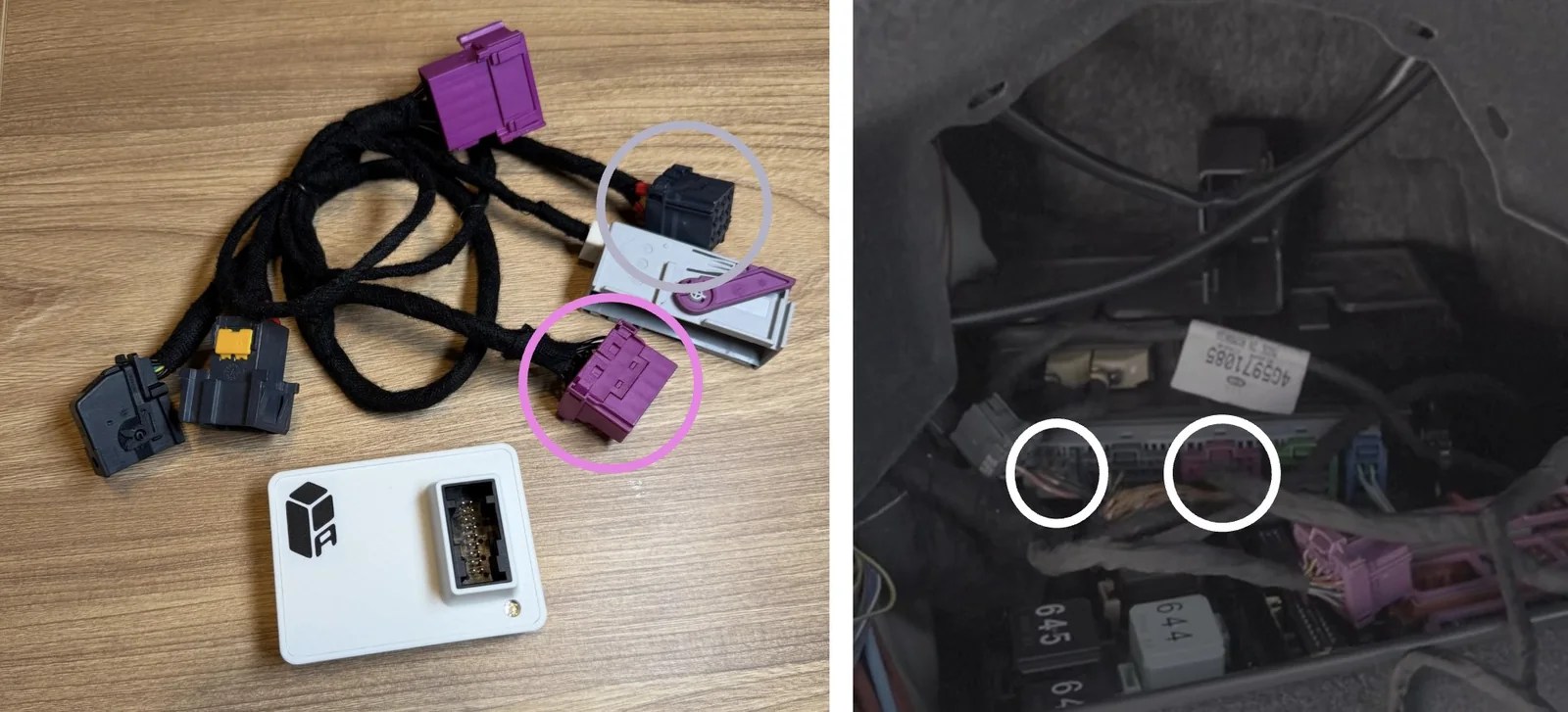
For the C7/C7.5 installation, A1 connects inline in the right rear trunk area. This accessible arrangement is one of the platform's main advantages for owners who want electronic height control. Follow the dedicated C7/C7.5 installation guide for battery preparation, connector handling and initial setup. The physical connection is only part of the job; verify the installation and establish the baseline before making new height profiles. If the car already has lowering links, you can keep them. Their mechanical offset needs to be included in the setup, along with any previous coding. Read the lowering-links compatibility guide if you are adding A1 to an existing build.
The inline harness adds electronic control
while retaining the factory system. Use the dedicated guide for connector handling, vehicle preparation and setup.
Find the front-to-rear balance you like
Start by recording each corner's wheel-center-to-fender measurement on level ground. Corner calibration establishes a reference; normal front and rear adjustment then lets you refine the rake, or front-to-rear height balance. This is particularly useful when the stance looks close but one axle needs a small adjustment. Rather than changing link lengths again, use the Wi-Fi web interface or Bluetooth mobile app to make the change and save the result. Keep the wheel and tire specifications in mind. A lowered C7 on a different wheel width, offset or spacer setup may need a different height than a similar car in a photograph. Save the actual setting you have checked on your own car.
Build profiles around how you drive
An everyday cruising profile gives you a familiar position to return to. A separate low profile can handle parked presentation, with on-the-fly adjustment available through the suspension's operating range. In many applications, Virtual Link can achieve the low appearance owners associate with a dedicated air-out setup. Owners who use the car on a closed course can also save height and rake settings for testing or launches. Treat these as repeatable setup choices; performance still depends on the complete car and needs to be evaluated rather than assumed from the drop alone. Assign the profiles you want to supported factory modes. Once configured, the phone does not have to stay connected and the app can be closed. The Drive Select guide walks through the relationship between a saved profile and a mode assignment.
Keep the everyday preset useful
Check the stance on familiar roads and across the full driveway entrance. Include the passengers and luggage the car normally carries. If a setting works only for a parked photo, keep it separate from the profile you use on the road. Virtual Link's benefit is that finding a better everyday compromise does not require giving up the low parked setting. You can keep both and return to the one you need. Ready to choose the hardware? View Virtual Link A1 and confirm your model and suspension before ordering.
Ready to choose your setup?
Buy now
